
Blog
How Multi Locations Inventory Management Enhances Customer Experience?

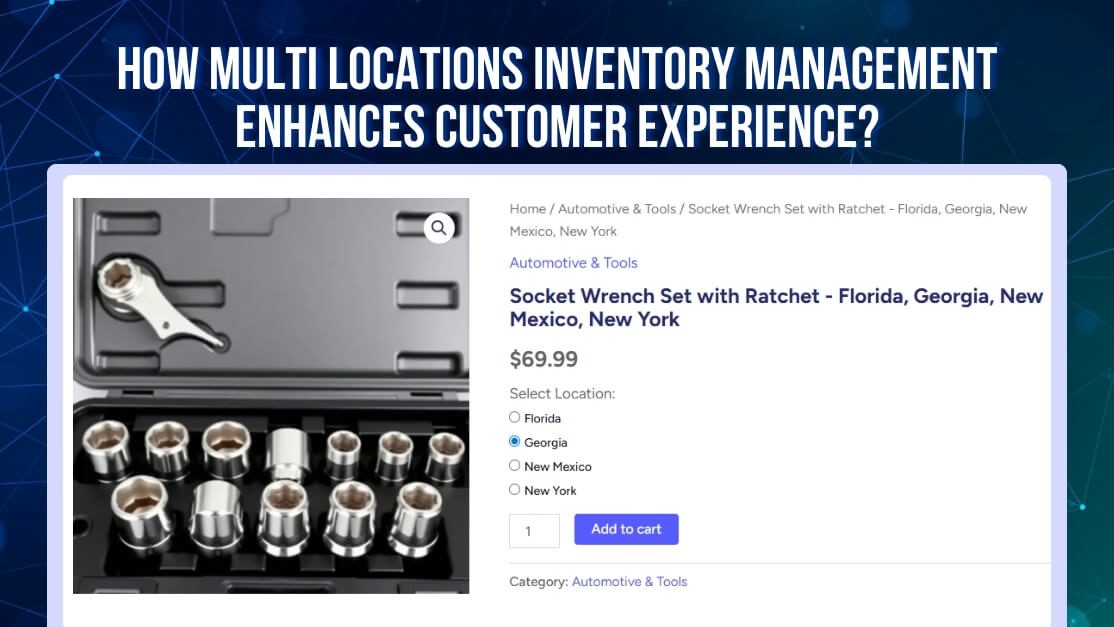
Multi locations inventory management improves customer experience by keeping stock correct and easy to track across all store sites. It helps teams work faster, fill orders on time, and avoid mistakes that upset buyers. The system shows real time data, so staff know where items are ready to ship. This leads to smooth service, fewer delays, and more trust from customers.
This guide explains how multi locations inventory management enhances customer experience? in simple and clear points. It covers better stock accuracy, smoother pickups, clearer updates, and stronger support. Each part shows how these features help both stores and buyers. Continue reading to learn how each benefit works.
Who Needs to Utilize Multi Locations Inventory Management System?
Businesses operating across multiple locations often face inventory visibility gaps and stock inconsistencies. A multi-location inventory management system centralizes control, synchronizes data in real time, and improves operational efficiency. Below are the key businesses that need to utilize it:
- Retail Chains: Retail chains with multiple storefronts rely on centralized systems to monitor stock levels, transfers, and prevent costly stockouts.
- E-commerce Businesses: Online sellers managing several warehouses need synchronized inventory data to fulfill orders quickly and avoid overselling products.
- Wholesale Distributors: Wholesale distributors operating regional distribution centers benefit from accurate tracking, streamlined replenishment, and improved order coordination across locations.
- Manufacturing Companies: Manufacturers handling raw materials and finished goods across plants require visibility to maintain production schedules and reduce excess inventory.
- Franchise Operations: Franchise businesses with independent outlets depend on standardized inventory control to maintain consistency, reporting accuracy, and operational transparency.
- Healthcare Providers: Hospitals, clinics, and medical suppliers managing supplies across facilities need precise tracking to ensure the availability of critical items.
How Multi Locations Inventory Management Enhances Customer Experience?
Multi locations inventory management helps stores give fast, smooth service. It keeps stock levels right and helps teams act with speed. It also cuts delays that upset buyers. Read the points below to see how it improves customer experience in simple ways.
Faster Order Fulfillment
A strong system lets staff see stock in every site at once. This means orders move faster because teams know where items are ready to ship. Buyers get their goods on time. It also lowers wrong picks and delays. This builds trust and keeps people happy with each buy.
Better Stock Accuracy
The system updates stock in real time across all stores. With multi locations inventory management working in the background, stock counts stay correct and clear. This stops items from showing as available when they are not. Buyers save time and shop with more trust. Teams can also plan restocking with better control.
Reduced Out Of Stock Issues
Live tracking helps teams see low stock before it runs out. When teams act fast, buyers find what they want. This means fewer skipped sales and fewer upset shoppers. It brings steady service across many sites. It also builds strong repeat buying.
Smooth In Store Pickup
The system helps staff spot the nearest site with the needed item. Buyers can pick up items fast without long waits. It cuts mix-ups and missed items at the counter. Stores run more smoothly. Pickup becomes quick and stress-free for everyone.
Clearer Delivery Updates
With one system, teams can track orders from store to doorstep. Buyers get clear updates that match the real status. This stops confusion about where items are. It also keeps support teams from guessing. Clear tracking builds trust and calm for buyers.
Easier Returns And Exchanges
Returns move fast when stock data is shared across all sites. Teams can place items back into stock right away. Buyers enjoy an easy and fair process. It also cuts hold times and errors. A smooth return process makes people want to shop again.
Helpful Support For Customers
Support teams can see all site data on one screen. This helps them answer questions with clear and fast facts. Buyers feel heard and get help that works. It keeps calls short and simple. This raises overall trust in the brand.
Signs Store Can’t Utilize Multi Location Inventory Management
Many stores face hidden issues that block the smooth use of multi location systems. These problems slow down work and hurt stock control across sites. See the signs below to learn what may stop a store from using it well, and move to the next key topic.
- Staff struggles with basic stock tasks because current tools feel too complex, making it hard for teams to handle shared data that moves across many store sites.
- The store depends on manual sheets and slow updates that often cause errors, which makes it tough to handle fast changes in stock across different locations.
- Teams cannot track stock movement between sites because there is no system that shows real time data, leading to confusion and late order handling.
- Store leaders cannot see stock levels across locations in one view, which stops them from making clear decisions about orders, transfers, and overall supply planning.
- Staff often send items to the wrong site due to poor tracking, which leads to delays and makes buyers feel unsure about the store’s service and reliability.
- The store has frequent stockouts because there is no strong way to predict needs across sites, causing lost sales and unhappy buyers who expect quick service.
- Teams fail to manage returns across locations because the process is slow and unclear, leading to missed items, wrong counts, and higher work pressure on staff.
Best Ways to Utilize Multi Location Inventory Management in an Online Store
Online stores can manage stock across many locations with the right tools and simple steps. These options help keep counts clear, cut delays, and improve order accuracy. Read below to learn the best ways to use multi location inventory management in an online store.
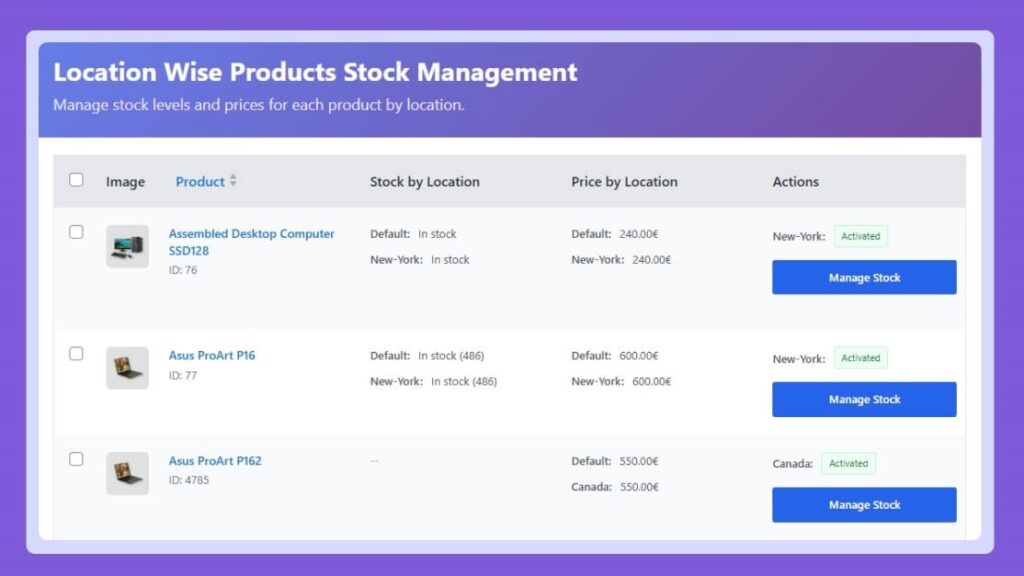
Use a Multi Location Inventory Plugin
A plugin helps stores handle many sites with ease. It syncs stock automatically and updates all locations in one system. Plugins like Multi Location Inventory Management for WooCommerce, ATUM Inventory Management, and WooCommerce Multi Locations Inventory support tracking, order flow, and item control. These options make daily work smoother for both staff and buyers.
Add Barcode Or QR Tracking
Scan tools make stock updates fast and simple. Staff can scan items during receiving, packing, and shipping. This cuts mistakes and keeps counts correct across every location. It also makes it easier to follow item movement from start to finish.
Set Clear Stock Rules
Rules help teams act at the right time. Stores can set alerts for low stock so items are ready before they run out. Transfer rules guide staff on how to move items between sites. This keeps stock balanced and reduces confusion.
Connect Inventory With The Online Store
Linking inventory to the site keeps stock levels correct during checkout. Buyers see real availability, which builds trust. It helps stores avoid overselling items that are no longer in stock. Teams also save time by having updates happen on their own.
Use Auto Reorder Tools
Auto reorder helps refill fast moving products. The system places new orders before levels fall too low. This reduces stockouts and keeps popular items ready for sale. It also removes guesswork and helps stores stay steady during busy times.
Train Staff On Shared Systems
Training helps teams use tools with confidence. Staff learn how to update counts, track transfers, and read reports. This improves workflow and lowers mistakes. A trained team keeps multi location stock in better shape.
Track Performance With Simple Reports
Reports show what is working and what needs fixing. Leaders can view stock levels, track movement, and see delays across all sites. Clear data supports smart decisions and steady inventory. It also helps spot trends that may affect future sales.
Before and After Using a Plugin for Multi-Locations Inventory Management
Without the proper tools, online retailers frequently find it difficult to manage inventory across multiple locations. A plugin can change how teams track items and handle orders. See the clear before and after view below to understand how a plugin improves multi location inventory work.
| Before Using a Plugin | After Using a Plugin |
| Stock updates are slow and often done by hand, leading to errors across different store locations. | Stock updates sync in real time, keeping every location aligned with accurate and clean counts. |
| Staff struggle to track items moving between sites and often guess stock levels. | Item movement is tracked within the plugin, helping teams see where products are at any moment. |
| Overselling happens because the online store shows outdated stock numbers. | The online store displays live stock levels, reducing overselling and improving customer trust. |
| Transfers between locations take time and often cause mix ups. | Transfers become simple with clear steps, alerts, and automated updates that cut mistakes. |
| Reports are scattered and hard to read, making decisions slow. | Reports become easy and clear in one place, helping leaders make faster and smarter choices. |
| Teams spend extra time fixing stock errors instead of focusing on sales. | Workloads drop because the plugin handles updates, alerts, and tracking with less manual effort. |
Using Multi-Location Inventory Management Features: Tips for Customers
Customers can benefit greatly when stores use multi location inventory systems correctly. These features help buyers find products faster and get clear stock information. Read the tips below to learn how customers can use these features wisely.
- Check Product Availability: Always check product availability across locations before placing an order online. This helps avoid delays and improves chances of faster pickup.
- Choose The Nearest Pickup Location: Select the nearest store location when pickup options appear during checkout. This reduces waiting time and speeds up order collection.
- Review Real Time Stock Updates: Look for real time stock updates shown on product pages. These updates help buyers know which store still has items.
- Use Location Filters While Searching: Try location filters while searching products in the store website. Filters help show items available near your preferred location.
- Track Orders From Different Locations: Keep track of orders shipped from different store locations. Tracking helps buyers stay aware of delivery progress clearly.
- Check Store Transfer Options: Check if stores allow product transfer between different locations. This option helps buyers get items that nearby stores lack.
Smart use of these features helps customers shop with less confusion and faster service. It also makes multi location inventory systems more useful for both buyers and stores.
Conclusion
Managing stock across many locations is not easy, but the right system makes it simple and clear. From retail chains to healthcare providers, many businesses need strong inventory control to avoid errors and delays. If you wonder how multi locations inventory management enhances customer experience, the answer is simple. It keeps stock accurate, speeds up orders, supports easy returns, and helps teams serve buyers better.
When stores use smart tools like plugins, barcode tracking, and auto reorder systems, daily work becomes smooth and stress free. Customers enjoy faster service, clear updates, and fewer stock issues. In the end, better inventory control builds trust, improves loyalty, and supports steady business growth.



Artificial intelligence has changed the way digital content is created. Earlier, producing professional photo edits, realistic face animations, and high-quality videos required expensive software, technical knowledge, and advanced editing skills. In 2026, AI-driven platforms allow anyone to generate realistic visuals, animated portraits, and engaging videos within minutes.
Talking photo AI free tools and Magic Hour face swap AI are two technologies attracting significant attention among creators, businesses, educators, and marketers. These solutions enable users to transform everyday images into interactive digital experiences. From realistic face replacement and AI-generated characters to talking portraits with natural expressions, modern AI tools are making advanced editing accessible for both beginners and professional creators.
From my experience testing different AI photo and video platforms, the biggest differences between basic tools and advanced AI solutions are realism, workflow efficiency, customization options, and final output quality. Some platforms only provide simple face swapping, while advanced solutions combine image editing, animation, lip sync, and video generation into a complete creative workflow.
In this Best Face Swap Photo AI Tools 2026 comparison, we will explore features, results, pricing, free options, and overall performance to help creators choose the right AI-powered platform.
Best Face Swap Photo AI Tools 2026: Review and Comparison
The AI face swap and talking photo market includes many platforms with different strengths. Some tools are designed for entertainment and quick experiments, while others support professional content creation, marketing campaigns, education, and digital storytelling.
| Tool | Best For | Free Access | Key Strength |
| Magic Hour | Best AI Creation Platform Overall | Yes | Complete Face Swap, Talking Photo, and Video Workflow |
| HeyGen | AI Talking Avatars | Yes | Realistic Digital Characters |
| CapCut AI | Social Media Videos | Yes | Fast AI Animation |
| Canva AI | Designers and Beginners | Yes | Basic Creative Editing |
| Fotor AI | Photo Enhancement | Yes | Easy AI Improvements |
1. Magic Hour Face Swap AI – Best Face Swap Photo AI Tool of 2026
Magic Hour face swap AI is one of the most advanced AI-powered creative platforms available in 2026. It provides a complete workspace for realistic face swapping, AI image editing, talking photos, lip sync technology, and video creation.
Unlike basic face swap applications that simply replace facial features, Magic Hour focuses on realistic results. The platform maintains facial expressions, lighting conditions, skin texture, and overall image consistency to produce more natural-looking outcomes.
This makes it a powerful option for creators who need professional visuals for social media campaigns, advertisements, educational videos, entertainment projects, and digital storytelling.
One of the most impressive features of Magic Hour is its talking photo AI free capability. Users can upload a single portrait and transform it into a realistic talking character within a few clicks. The platform creates facial movements, synchronized expressions, and natural animations without requiring expensive equipment or professional animation experience.
Another major advantage is its complete AI creation workflow. Users can generate images, edit photos, improve quality, create videos, and explore multiple AI models from one platform instead of relying on separate applications.
Magic Hour also allows users to create fast variations and multiple creative attempts, making it easier to explore different results. Its templates and automated workflows are beginner-friendly while still offering advanced features required by professional creators.
Magic Hour Pricing
Magic Hour provides flexible plans according to different user needs.
Free Plan:
The free plan allows users to explore basic AI creation features and experience the platform before upgrading.
Creator Plan:
The Creator plan costs $19/month or $12/month billed annually. It provides additional credits, advanced features, and greater creative flexibility.
Pro Plan:
The Pro plan costs $39/month and is designed for users who need higher usage limits and professional workflows.
Official pricing details are available here: https://magichour.ai/pricing
What Sets Magic Hour Apart
Magic Hour offers several advantages compared with traditional AI editing tools:
- Realistic AI face swapping with natural results
- Advanced talking photo creation
- AI-powered lip sync technology
- Image-to-video conversion
- Multiple AI models in one platform
- One-click creative workflows
- Desktop and mobile support
- Easy free access without complicated setup
- Suitable for creators, marketers, and businesses
With these features, Magic Hour remains one of the strongest choices for users searching for the best AI face swap and talking photo solution in 2026.
2. HeyGen – Best Talking Photo AI Free Alternative
HeyGen is a popular AI video platform focused on talking characters and digital avatars. Users can upload images, add scripts, or record voices to create videos with realistic facial movements.
Businesses, marketers, and content creators use HeyGen when they need professional-looking videos without appearing on camera.
The platform performs well for AI avatar presentations and multilingual videos. However, it mainly focuses on avatar creation rather than complete AI photo editing. Users looking for advanced face swapping, creative image transformation, and complete video workflows may prefer an all-in-one solution like Magic Hour.
Advantages
- Creates realistic AI avatars
- Good lip synchronization
- Supports multiple languages
- Useful for corporate videos
Disadvantages
- Limited advanced photo editing features
- More focused on avatars than face swap creativity
3. CapCut AI – Best AI Face Animation Tool for Social Media
CapCut AI is popular among social media creators because of its simple interface and fast editing workflow.
The platform allows users to animate photos, apply AI effects, create captions, and produce short videos for TikTok, Instagram Reels, and YouTube Shorts.
For beginners who want quick content creation, CapCut is an excellent option. However, it is more focused on social media editing rather than professional AI face swapping or advanced talking photo generation.
Benefits
- Free AI features available
- Fast editing workflow
- Excellent for short-form videos
Drawbacks
- Limited professional AI workflows
- Less advanced face transformation capabilities
4. Canva AI – Best AI Photo Editor for Beginners
Canva AI is an easy-to-use platform that combines AI editing features with thousands of design templates.
Users can create images, remove backgrounds, enhance designs, and develop marketing materials through simple instructions.
It is especially useful for students, teachers, small businesses, and social media managers who need quick visual content.
However, Canva AI is not specifically designed for realistic face swapping or advanced talking photo animation.
Pros
- Simple user interface
- Large template library
- Great for design projects
Cons
- Limited AI animation features
- Not built for professional face swap technology
5. Fotor AI – Best AI Photo Enhancer for Speed
Fotor AI provides simple photo editing features, including image enhancement, background replacement, and creative effects.
It is ideal for users who want quick improvements without learning complicated editing software.
Although useful for basic editing, Fotor does not provide the same advanced AI animation, face swapping, and talking photo features available in specialized platforms.
Talking Photo and AI Face Swap Trends of 2026
AI photo and video creation is moving toward complete creative ecosystems. Instead of using separate tools for editing, animation, voice generation, and video production, creators are choosing platforms that combine multiple AI features.
AI face swaps, talking avatars, image-to-video generation, and prompt-based editing are becoming essential technologies for modern digital creators.
Businesses are also adopting these solutions for advertising campaigns, personalized marketing, online education, product demonstrations, and customer engagement.
Final Verdict
The best AI face swap and talking photo tool depends on your specific requirements. Free talking photo AI free tools are useful for beginners who want to experiment, while professional creators need realistic results, advanced controls, and reliable workflows.
Among the Best Face Swap Photo AI Tools 2026, Magic Hour face swap AI stands out because it combines realistic face swapping, talking photos, lip sync, AI editing, and video creation in one powerful platform.
For users searching for a reliable talking photo AI free solution, Magic Hour provides an excellent balance between accessibility, creative features, and professional-quality results.
Frequently Asked Questions
What is the best AI tool to swap faces in 2026?
Magic Hour face swap AI is one of the best options because it provides realistic face swapping, talking photos, lip sync, and video creation features.
Can I make talking photos for free?
Yes. Many platforms provide free talking photo features, including Magic Hour and other AI avatar tools.
Is Magic Hour free to use?
Yes. Magic Hour offers a free plan that allows users to explore AI creation features before upgrading to paid plans.
Which AI tool creates realistic talking images?
AI platforms with advanced facial animation and lip synchronization create the most realistic talking images. Magic Hour is designed specifically for realistic talking photos and AI video workflows.


The term cas gde has gained attention in discussions related to digital systems, online services, and modern technological processes. As businesses and institutions continue shifting toward digital operations, terms like cas gde become increasingly relevant for professionals, developers, and users seeking efficient solutions. Although many people encounter the phrase in technical environments, they may not fully understand its purpose or significance. Understanding how cas gde functions can help organizations improve system management, data handling, and user experiences. With technology becoming a central part of everyday operations across industries, learning about concepts connected to cas gde provides valuable insight into how modern digital environments continue evolving globally.
What CAS GDE Represents in Modern Technology
Cas gde is commonly associated with structured digital environments that focus on improving system organization and operational efficiency. In many technical settings, the term may relate to authentication processes, data exchange systems, or specialized digital frameworks designed to streamline communication between platforms. Technology professionals often use systems connected with cas gde to support secure access, maintain workflow consistency, and improve reliability across multiple services. As organizations continue depending on cloud computing and interconnected applications, the need for structured digital solutions becomes increasingly important. Cas gde reflects the broader movement toward integrated technology systems that prioritize security, accessibility, and smooth user experiences in both professional and educational environments today.
The Role of CAS GDE in Secure Access Systems
Security remains one of the most important priorities in digital operations, and cas gde contributes to creating safer and more reliable access systems. Organizations handling sensitive information require secure authentication methods that protect user data and prevent unauthorized access. Systems associated with cas gde often support identity verification and controlled entry into digital platforms. This process improves user trust while helping businesses maintain regulatory compliance and operational stability. Secure login systems also reduce risks linked to cyber threats and unauthorized activity. As digital transformation expands globally, companies increasingly rely on advanced technologies connected with cas gde to strengthen cybersecurity measures and ensure safer online interactions for employees and customers alike.
How CAS GDE Improves Workflow Efficiency
One significant advantage of cas gde is its ability to support efficient workflows within organizations and digital platforms. Modern businesses often manage large amounts of information across multiple departments and systems. Without proper coordination, these processes can become slow and difficult to manage. Cas gde solutions help organize operations by simplifying communication between digital tools and improving data accessibility. Employees can complete tasks more effectively when systems operate smoothly and securely. Improved workflow efficiency also enhances productivity and reduces unnecessary delays that affect organizational performance. By supporting structured operations, cas gde contributes to better decision-making, stronger collaboration, and more reliable management of digital resources in various industries worldwide.
The Growing Demand for Integrated Digital Solutions
The increasing reliance on digital technology has created strong demand for integrated systems connected to cas gde. Businesses today require platforms that can communicate effectively while maintaining data consistency and security. Integrated solutions allow organizations to connect software applications, databases, and online services into a unified environment that improves operational control. Cas gde reflects this growing trend by supporting smoother digital interactions and reducing technical barriers between systems. Industries such as education, healthcare, finance, and information technology benefit greatly from integrated platforms that simplify complex processes. As digital ecosystems continue expanding, organizations increasingly recognize the importance of adopting efficient systems that support long-term scalability and technological adaptability.
CAS GDE and User Experience Enhancement
User experience has become a major focus in digital development, and cas plays a role in creating more convenient and reliable online interactions. Users expect systems to function quickly, securely, and without unnecessary complications. Platforms connected with cas often emphasize streamlined access, simplified navigation, and consistent performance across devices. Improving user experience benefits both organizations and consumers because it increases satisfaction, engagement, and trust. Businesses that invest in user-friendly systems are more likely to retain customers and maintain competitive advantages in digital markets. As technology evolves, cas continues supporting efforts to create smoother, more efficient digital experiences for users in professional and personal environments alike.
The Importance of CAS GDE in Educational Platforms
Educational institutions increasingly depend on digital systems to manage learning environments, online resources, and student access services. Cas supports these environments by helping institutions organize secure and efficient digital operations. Students and educators benefit from systems that provide reliable access to learning materials, communication platforms, and academic records through centralized digital solutions. Educational technology continues expanding rapidly as schools and universities adopt online learning tools and hybrid educational models. Cas contributes to this transformation by improving accessibility, supporting secure authentication, and enhancing administrative efficiency. As digital education grows globally, reliable technological systems become essential for maintaining effective learning experiences and institutional performance in modern academic environments.
Challenges Associated With CAS GDE Implementation
Despite its advantages, implementing systems related to cas may present challenges for organizations transitioning to advanced digital environments. Technical integration can require significant planning, financial investment, and employee training to ensure successful operation. Organizations may also encounter compatibility issues when connecting older systems with newer digital technologies. Security management and system maintenance require continuous monitoring to prevent operational disruptions and cyber risks. In some cases, users may initially resist adopting unfamiliar technologies that change existing workflows. However, organizations that invest in proper implementation strategies and ongoing technical support often achieve long-term benefits. Addressing these challenges carefully helps businesses maximize the effectiveness and reliability of cas systems.
The Future of CAS GDE in Digital Transformation
The future of cas appears closely connected to ongoing advancements in digital transformation, automation, and cloud-based technologies. As businesses continue modernizing operations, demand for secure, integrated, and scalable digital systems will likely increase significantly. Artificial intelligence, machine learning, and advanced cybersecurity solutions may further enhance the capabilities associated with cas environments. Organizations are expected to prioritize systems that support flexibility, efficiency, and secure data management in increasingly connected digital ecosystems. The continued growth of remote work, online education, and digital services also reinforces the importance of reliable technological frameworks. Cas will likely remain an important part of future strategies focused on innovation and operational improvement.
Conclusion
Cas gde represents an important concept within modern digital environments where security, efficiency, and integration continue shaping technological progress. From improving workflows and enhancing user experiences to supporting education and secure access systems, its influence extends across multiple industries and applications. As organizations increasingly adopt advanced digital solutions, understanding systems connected with cas becomes more valuable for professionals and users alike. Although implementation may involve challenges, the long-term benefits of organized and secure digital operations remain significant. With technology evolving rapidly across global markets, cas continues contributing to the development of smarter, more connected, and more reliable digital systems for the future.





-
 Entertainment11 months ago
OGFap Review: Pros, Cons, and User Experience
-
 Fashion11 months ago
Comme des Garcons: The Iconic Avant-Garde Fashion Brand
-
 Blog12 months ago
i̇ns: Exploring Its Meaning, Values, and Modern Impact
-
 Blog12 months ago
鲁Q 669FD License Plate Lookup – Car History & Vehicle Records
-
 Life Style11 months ago
The Ultimate Guide to Halloween Contacts for Eyes: Everything You Need to Transform into Your Darkest Character
-

 Education7 months ago
Learn SQL Online: 8 Best Courses with Certificates in 2026
-
 Fashion10 months ago
Custom Jersey Printing: Designing Your Team’s Identity with SeamJersey
-
 Uncategorized12 months ago
Manga18fz: A Complete Guide to the Trending Manga Platform